Showing posts with label photo retouching. Show all posts

Clipping path is an awesome technique to cut out an object from its respective background. In Adobe Photoshop CS5, here are the steps to create a clipping path. Check them out:


  • Pick the pen tool from the tools palette and create a path around the object or the image. An outline is created to cut the object out from the background.
  • Save the path in the paths panel from the panel menu and name it anything you want to. Once the path is saved, move ahead.
  • Now choose clipping path from the panel menu and in the clipping path dialog box, choose the path from the drop down list. Click OK.
  • Now set the flatness value to determine the speed with which you are creating the outline. For faster processing, set the higher amount. At the high value, you will see straight edges instead of curved ones.
  • Save the file in the Photoshop EPS format from the drop down menu. Click OK.
For Better Understanding see the video tutorial bellow:

You did it right!


Photoshop Drop shadows create nice effects when applied on the photos. They have the potential to add realism to the images by giving them a natural feel. Also, you don’t need to wait for the natural shadows to occur but Photoshop can perform the task well.


Working with the layers, nice shadow effects can be created to give a 3d look to the images. Different settings are there which helps you to find different shadow effects that you can apply on the photo depending upon the requirements. To create unexpected photo effects, use nice shadows and create proper angles so that the shadow looks perfect. Size, distance and spread matters a lot in the whole appearance of the shadow in the image so whenever you mix and match them, take care to create them in a proper manner.

Go to Photoshop and play around with creating drop shadows. Have any questions, let us know.

For Better Understanding see the video tutorial bellow:

Image alteration can be done nicely in Photoshop with the use of image manipulation techniques. Changing the eye color, lip color or hair color can be beautifully achieved with manipulation tools. Anything can be changed using Photoshop and that too flawlessly. Let us start manipulating the image:

image manipulation techniques

  • Open the image in Photoshop
  • Create a duplicate layer by pressing Ctrl+J or right click on the layer to create duplicate layer.
  • Change the blending mode to Overlay so that the light gets less.
  • Now go to Add layer mask icon to create a layer mask and then put black color in it using fill command.
  • Choose soft corner brush and use white color to paint the eye that has black color. You can see that the eye will be bright now.
  • Here you have to create one new layer. Choose the Soft light from blending mode. Paint with white color.
  • With this method, one eye color will be changed. Follow the same method for another eye.
Hope you get to know the proper method of image manipulation. Use proper techniques and get best results.


Software makes the difference in the type of editing. The choice of software must be right if you want the right photo editing. All the tips and tricks go in vain if the photo editor doesn’t have the knowledge of the right software.


To accomplish the perfect editing, the editor must have the complete knowledge and view of the software that he is using. Software that has easy navigation is the most perfect that has the capability to bring great results.

Software that most of the designers use is the versatile Corel Draw. Various designers have claimed it to be the best software in the market ever after Photoshop. Smooth editing, easy navigation and 100% quality results are few of the features of this software. With the completed work, you can save it in any format as you wish for! However, it is the choice of every beginner and professional to do right photo editing by spending as much time as you want.

For those designers who are working at pro levels, Corel Draw and Photoshop are the best software to use. Raster to vector conversions is beautifully done in Corel Draw and the scope of graphic is on a wider scale. Right from the editing to designing, these software offer the best results.
Happy photo editing!

A leading Image Background Remove, Retouching and image shadow provider for Photographers,Online Retailers,Advertising Agencies. More : http://clippingpathking.com/

Professionalphotography is the success meter of an online brand that can bring in a lot of business without much ado. Customers take your website seriously only if you are serious about what you are offering. Perfect photography is the first impression so try to create stunning images. Let’s take a look on these steps and take photography to a new level:

Proper Light

Lighting plays a major role in displaying the right colors and features of a product. Consistent lighting elevates your product and makes it look more appealing. You can click a nice photo using proper lighting. If natural light is not present, then you can create beautiful artificial light using some external flash of your camera.


Keep Focus on the Object

Focussing on the object is highly important to capture great shots. Focus on the centre while shooting product photos because wider aperture is needed for that. Wider aperture will make sure to separate the object from the background thus giving you more beautiful backdrops.

Take Several Shots

It will save the editing time that you have to put in later on. During photoshoot, first of all take some test photos to make sure that the lighting, aperture or lens is appropriately set. Take several shots to save some time because if one picture doesn’t look that good, you will always have the option to use another picture with perfect settings.

Keep Experimenting with Different Shots to get One Perfect Picture

Photography is intimidating so you have to take few shots unless you don’t get one perfect shot. Experiment with pictures and try to find the perfect shot that suits best to you. Apply these steps and no one can stop you from getting stunning pictures in no time.

Happy photography!!


Background removal is quite an easy method in Photoshop that is used for image manipulation. This technique is accustomed to remove the unwanted backgrounds of an image that are either old, bad or damaged. In some images, unwanted backdrops are there which needs to be eliminated to give an enhanced look to the image. Images are the important part of everyone’s life so they must look perfect. Not only do the random images, but also the images at the websites must look flawless.


When you want to show your product at your online portal, the images need to look good. And it can be achieved through background removal services that you can avail at photo editing companies. Background removal changes the outlook of whole image and makes it look eye-catching. To remove the background, you have to cut out the image using different tools like magic wand, pen tool, quick selection or lasso tool.


Background removal holds major significance in online world as not-so-looking good images can break your online goodwill. So to spruce up the images, you have to remove the backgrounds from them and add new backgrounds. Moving the image to a new background looks cool and great if you are not interested in the old background.

Find a good photo editing Service Company to edit your images if they are in bulk and utilize your time in other important activities of your website :www.clippingpathking.com

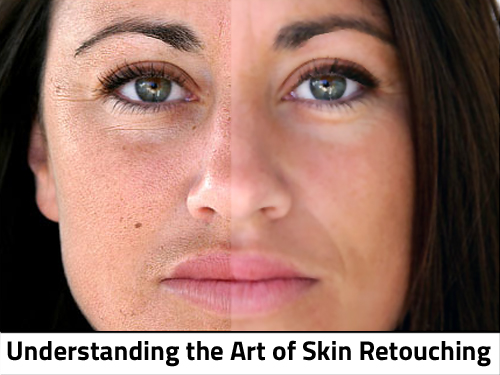
So what is photo retouching? Well, it’s an art of editing the photos for flaws and imperfections. Being a photographer or an editor, you have to retouch the photos to make them look impeccable and this editing is done post production. So you may have to edit thousand of pictures at one time. Can you do that? I guess not because it is not that easy as one think. 

Some pictures need only basic editing like color correction, spots or blemishes and some need heavy editing. So the charges also vary depending upon the type of editing.
Bringing to your knowledge, photo editing companies charge somewhere between 2$ to 20$ an hour. So the choice is yours about what to charge!!
You can charge anything you feel because people pay even thousands of dollars to get the work done. But yes obviously, the quality also varies as in fewer prices one cannot expect miracles to happen. 
As a basic charge, you can charge 2$ per photo where it involves basic editing like color correction, color enhancement or spot removal etc. Photo retouching is a time consuming work so make sure to charge considerably as you are not doing charity here… So get paid for what you do and don’t go insane ever by offering your services for lesser prices though.