Showing posts with label image cut out. Show all posts

Clipping path is a tool used in Photoshop to cut out objects or people. It allows user to create image files with transparent backgrounds for use in print layouts-whether magazine, brochure or book layouts-in software program also. It is basically a vector path which helps in displaying only a part of image contained within the path that will appear in your layout programme.


Just follow these steps to create clipping path in Photoshop:

  • Choose an image to design or edit in Photoshop.
  • Open Photoshop.
  • Open the image into Photoshop.
  • Draw clipping path.
  • Remove the background by pressing Ctrl+enter.  Inverse and continue by pressing delete button to cut out background.
  • Fill the background with white color using bucket tool. This is a necessary step for users who want to use image as online content or for e-commerce site.

Following this method can make you a perfect clipping path and remove product image background. Have a good day!!


Image manipulation involves the usage of many techniques and background removal is one of them. Erasing the unwanted elements or the whole background is essential when you want to showcase your products on your e-commerce portal. No matter what the niche of your website is, picture quality does matters and that can be achieved by removing the background to a great extent.


Removing thebackground of an image changes the whole outlook of an image thus making it look better than ever. You can easily make your image attract the eye balls of the viewers with just a little usage of Photoshop tools. ClippingPathKing.com is here to deal with all such photo editing services at highly affordable prices. Also, we have a creative bent of mind to put that unique element that people like to see in online portals. Now you don’t have to compromise with the bad images when we are here to help you.

By removing the dull backgrounds and making the pictures look perfect by adding up some spice is what we do!! So let’s make the images cool and flawless using image background removal services.

Clipping Path Services are Beneficial for Background Removal


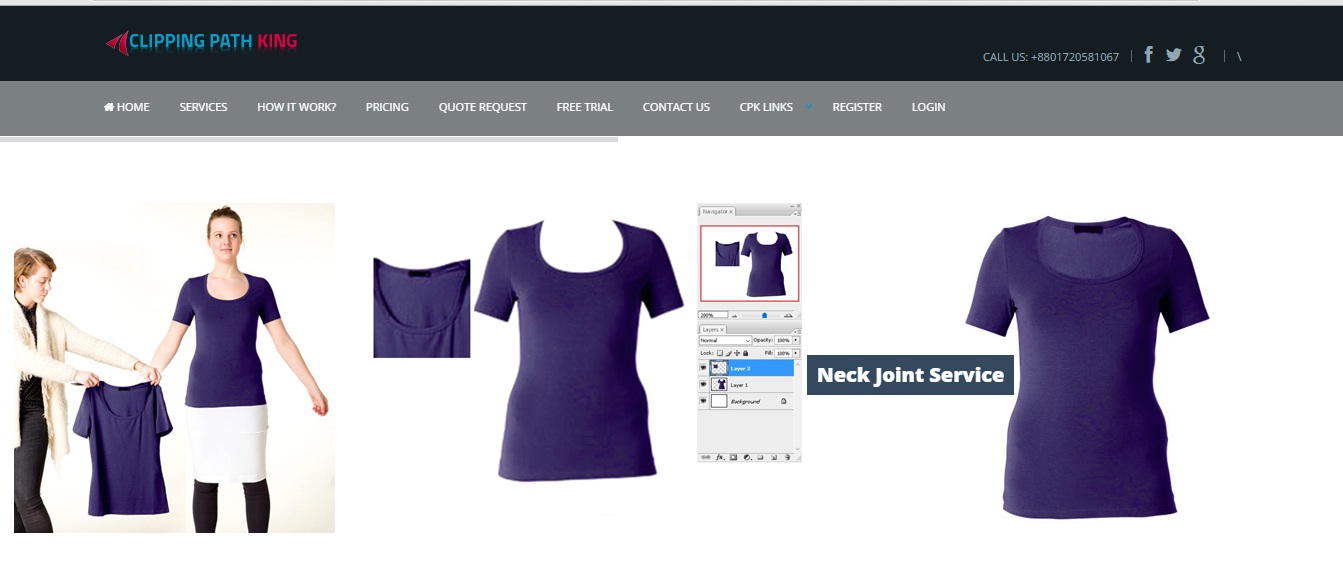
Clipping Path King is an established company for photo editing services. The company deals in every type of photo requirements i.e. color correction, clipping path, photo editing, background removal, adding shadows or reflections, adding white backgrounds and much more that you cannot even think of. Other image editing services like ghost mannequin, neck joints, editing the images for online portals are also offered by the company at affordable prices.

Why choose Clipping Path King


Now with the advancement of Photoshop versions, the old methods to cut out or knock off any background are made easy with the help of clipping path. In the era of digital photography, you always feel the need to edit the image background in case of any flaws. So here Clippingpathking comes in scene to offer their remarkable clipping path services to make background adjustments in the image. Clipping path services give a variety of advantages to the businesses or online portals in becoming successful after removing the backgrounds from their product images.

So hire the services of www.Clippingpathking.com to get the best results.

Best eCommerce Product Photo Editing Services Provider Company


ClippingPath King is the expert company offering image editing services, located in Bangladesh. Photo retouching, color correction, adding shadows or any other type of image processing work is done here at pocket friendly prices. We offer free trial services for 2 images so that you can feel satisfied with the work done and make a decision on whether or not to hire us. Quality is guaranteed, fast delivery is offered and proper customer support is taken care of.

Clipping Path King Experts Team and Services


Clipping Path King has well versed team of experts that work on your images in order to deliver the best results within the deadlines. For the new clients, discounts are offered. Also, on bulk orders, special discounts or packages are offered. Just place an order with us specifying your requirements and one of our team members will get back to you within the shortest possible time.

Clipping Path King Customer Satisfaction 

We believe in delivering work that is actually liked by our clients because we want to build a long term association. Not only we make sure to deliver the best results, but also make our clients happy with flawless services. We do what you want to meet your expectations in every possible manner we can.

Take out sometime to explore our website and get to know something more about us: www.clippingpathking.com/
Background removal is quite an easy method in Photoshop that is used for image manipulation. This technique is accustomed to remove the unwanted backgrounds of an image that are either old, bad or damaged. In some images, unwanted backdrops are there which needs to be eliminated to give an enhanced look to the image. Images are the important part of everyone’s life so they must look perfect. Not only do the random images, but also the images at the websites must look flawless.


When you want to show your product at your online portal, the images need to look good. And it can be achieved through background removal services that you can avail at photo editing companies. Background removal changes the outlook of whole image and makes it look eye-catching. To remove the background, you have to cut out the image using different tools like magic wand, pen tool, quick selection or lasso tool.


Background removal holds major significance in online world as not-so-looking good images can break your online goodwill. So to spruce up the images, you have to remove the backgrounds from them and add new backgrounds. Moving the image to a new background looks cool and great if you are not interested in the old background.

Find a good photo editing Service Company to edit your images if they are in bulk and utilize your time in other important activities of your website :www.clippingpathking.com


Photoshop CS3 is used widely by everyone who have not updated to the newer versions. Today I am going to teach you how to remove thebackground of an image in Photoshop CS3. Various ways are there to do this task, but let’s see this method first 


  • 1. Open Photoshop CS3.

    2. Load your image for which you want to remove the background.

    3. Create a duplicate layer of the original layer by clicking on layer>duplicate layer.
        Hide the background layer.

    4. Go to “edit in quick mask mode” at the bottom of the toolbar. 

    5. Press D as it will reset the colors to black and white.

    6. Pick the brush to hide the areas that you don’t want. Highlight the areas that you want to            remove and that you want to keep. 

    7. Simply put, you have to paint the background black by highlighting it and get rid of that area.
    Once when you are done with the painting, go to “edit in standard mode”. 

    8. This option is located in the toolbar next to quick mask mode. Clicking this option will create a selection of what you don’t want in the image. Hit Delete and there you go!!

    9. Or you can use the eraser tool to remove the background by duplicating the original image.

    Other than this method, you can also use magic wand tool and clipping path for background removal. Have a great day!!